Plug-Ins By Higgs Brando presents

KNOCKDUCKJUICE

A home for your voice inside any beat, carved as the song plays, then mastered loud. One plugin on the Stereo Out. Three dials. Eight characters.

▶ Hear it: flip Bypass on a real session
macOS · AU + VST3 · Apple Silicon + Intel
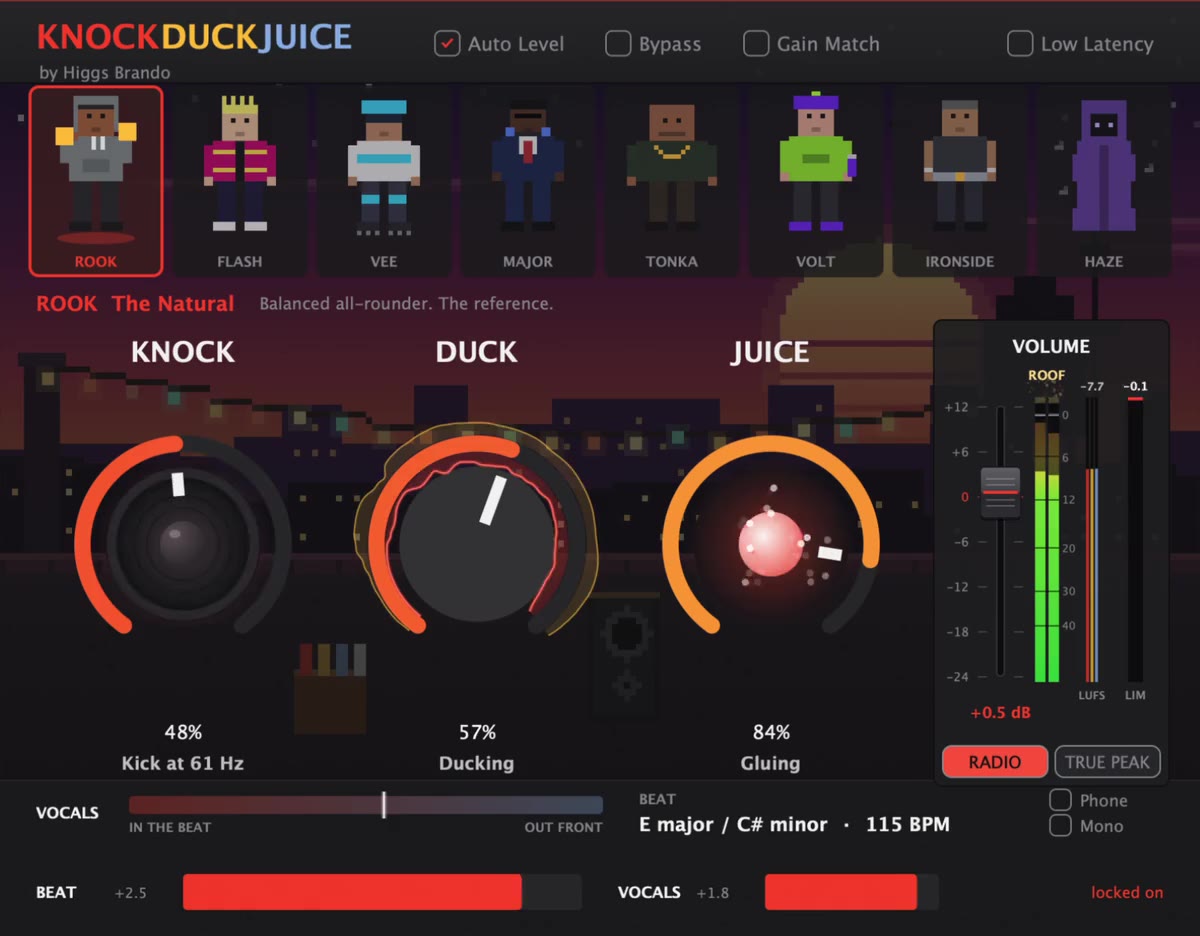
The KnockDuckJuice plugin window with ROOK selected: eight characters across the top, three dials (Knock, Duck, Juice), and Logic-style meters
ROOK · THE NATURAL

Any beat.
Room for your voice.

KnockDuckJuice sits on your Stereo Out, with your vocal sent to its side chain. As the song plays it listens to both, and wherever the beat crowds your voice it carves out room, only in the frequencies that clash and only for as long as they clash. The beat keeps its low end and its space, and your voice gets its place. Then the whole song is mastered loud, together.

No stems, no bus routing, no chain of ten plugins. Three dials and a character.

"Put the voice in the middle. Let the song come to you."
vocal ─► side chain mix ─► find the vocal ─► split beat ─► KNOCK ─► DUCK ─► width ─┐ vocal ──────────────────────┴─► JUICE ─► out

Three dials.

CHAPTER 01

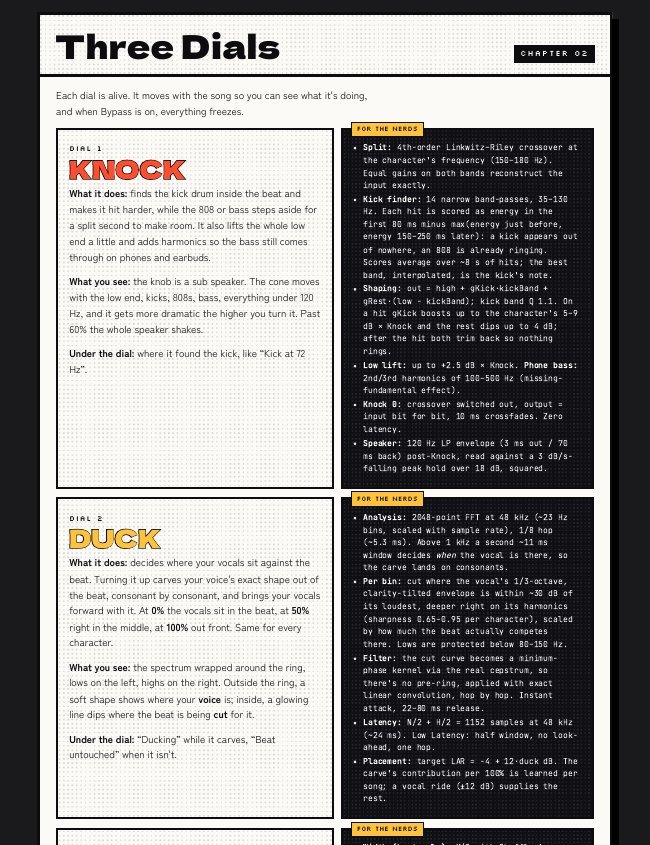
KNOCK

Pitch-tracked transient shaping: a bank of fourteen narrow filters listens to every low-end hit and learns which note your kick is tuned to. On each kick, that note punches forward while the 808 steps aside for a few tens of milliseconds, then both settle so nothing rings. Psychoacoustic bass adds the harmonics your ear uses to hear low notes, so the kick and 808 still come through on phones and earbuds. At 0% the low end is untouched, bit for bit.

On screen: a sub speaker that moves with the real low end.

DUCK

Dynamic spectral unmasking: sidechain ducking across a thousand bands, re-decided about 190 times a second. Wherever your voice is right now, the beat steps back exactly there, only as far as it's in the way, and swings straight back the moment you stop. A held note gets a soft pocket, a “t” gets a quick, narrow one. 0% sits the vocals in the beat, 50% in the middle, 100% out front. Same for every character.

On screen: your voice and the cuts, wrapped around the ring.

JUICE

Program-adaptive bus processing: glue compression whose threshold follows the song's own level, so it grips the quiet verse and the loud hook the same way. Saturation in the character's flavour, oversampled and kept off the low end. Stereo width on the beat only, never your vocal, and a de-esser that listens to your voice alone. Its makeup gain is predicted instead of waited for, so every turn of the dial is louder and denser straight away, and the limiters below catch the peaks.

On screen: a glowing particle that speeds up as you turn it.
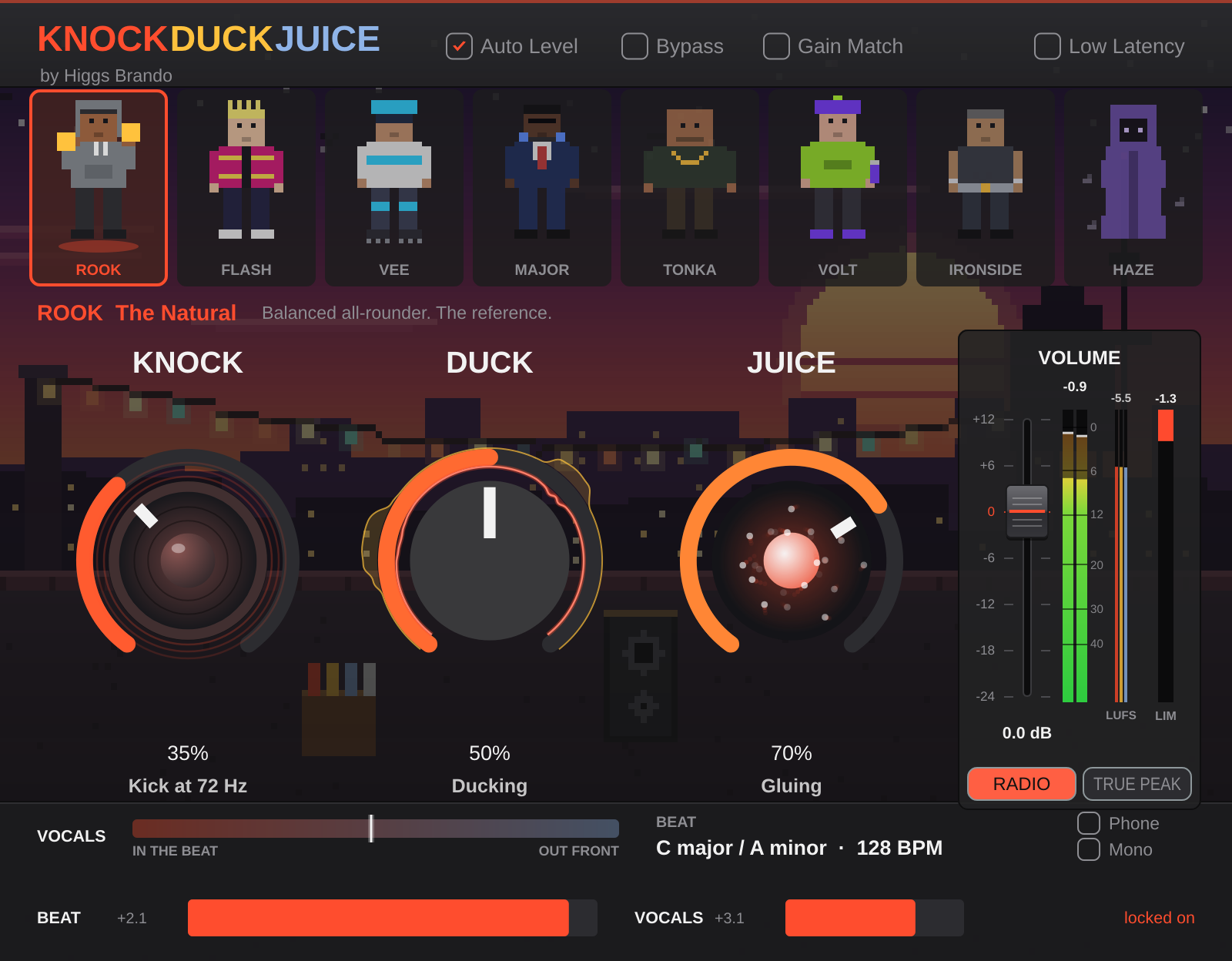
KnockDuckJuice running on a session in Logic
HEAR IT

Flip Bypass.

A real session in Logic: a beat, a vocal and KnockDuckJuice on the Stereo Out. Play it, then flip Bypass back and forth while the song keeps going, with the plugin's screen moving along.

Listen now

Choose your character.

CHAPTER 02
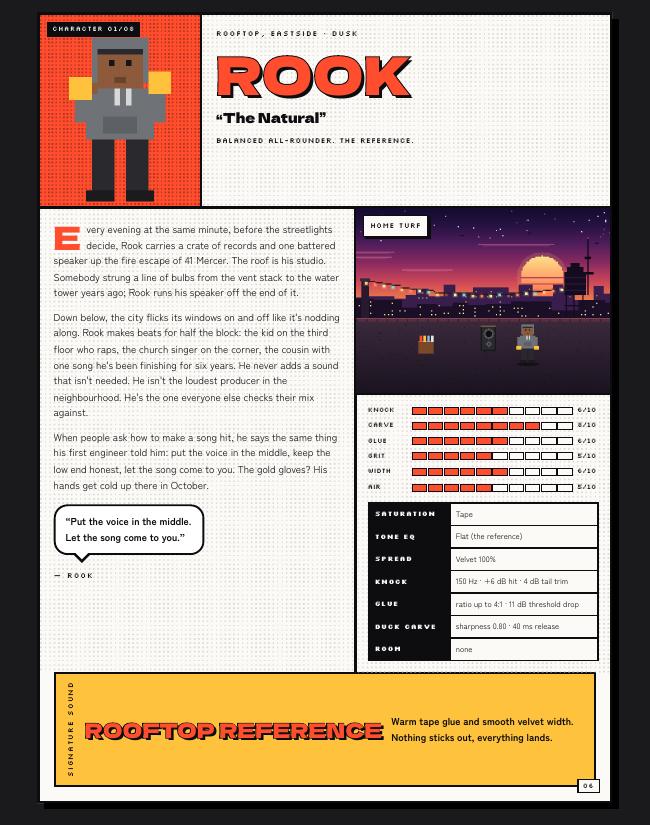
ROOK
The Natural

Eight underground musicians, each with a neighbourhood, a saturation flavour, a kick, a glue and a carve of their own. Same three dials, eight different records. Every character is always on, so flipping Bypass always tells you something.

Then it's mastered.

CHAPTER 03

The last thing your song passes through is a full mastering chain, the kind that usually takes a rack of separate plugins and an engineer to set up. Here it's one signal path, tuned by your character, driven by Juice, and listening to your vocal the whole way.

BEAT ONLY

Width

VELVET + HAAS · MONO-SAFE

Only the beat gets wider, so your vocal stays dead centre. Each character blends two kinds of spread: airy velvet-noise decorrelation and a bigger Haas delay. The low end stays mono, drum hits stay tight, and folded to mono the song adds back up to exactly the original.

BUS COMP

Glue

PREDICTIVE MAKEUP

Pulls the beat and your voice into one record. Its makeup gain is predicted from the song's own level history, so turning Juice never pumps or waits.

COLOUR

Saturation

4× OVERSAMPLED

Tape, dual triode, transistor or clean, in the character's flavour. It warms everything above the low end and leaves the sub untouched.

YOUR VOICE

De-esser

SIDECHAIN 4–10 kHz

Listens to your voice alone, so it softens your “s” without dulling the hi-hats.

CEILING

Limiter

4× OVERSAMPLED · TRUE PEAK

Brings it up to full level and holds the ceiling, between the samples too.

HOTTER

Radio

TWO-STAGE · +3 dB

A second full limiter in two smooth stages for the extra density of a record on the radio. On by default; one click to compare.

It levels itself.

Auto Level gain-stages the beat and your vocal in the first seconds you play, so every character starts in the right place, whatever you feed it.

0 dB means just touching.

On the Volume fader, 0 is the point where the limiter just starts working, for every song and every character. Push past it for louder, pull back for more air.

Bypass tells the truth.

Gain Match compares by BS.1770 loudness, the same measure streaming services use, so Bypass shows what the processing changes, not just that it's louder.

Ready to upload.

True Peak on keeps every peak, including the ones between samples, at −0.1 dBTP. The multimeter shows RMS, peak and LUFS (momentary, short-term and integrated), Logic style.

MEASURED
Peak with True Peak on−0.11 dBTP
Peak with True Peak off0.00 dBFS
Limiting at Volume 0≤ 1.9 dB
Level jump when Juice moves mid-song±0.3 dB
Bypass vs the original6×10⁻⁸

Offline renders of a 40-second test song at 44.1 kHz. Limiting is the 90th percentile. Your songs will vary.

Set up in three moves.

CHAPTER 04

Stereo Out

Put KnockDuckJuice on your Stereo Out (the master). Beat and vocal both go through it as usual.

Side Chain

In the plugin header, pick your vocal track in Side Chain. That's how it tells your voice from the beat.

Press play

Pick a character, turn the dials. Auto Level sets the volume for you in the first few seconds; Gain Match keeps Bypass a fair comparison.

Everything on one screen.

CHAPTER 05

True peak

Ozone-style true peak at −0.1 dBTP, or plain 0.0 peak with it off.

Auto Level

Sets the volume for every character so 0 starts just on the roof.

Gain Match

Bypass is level-matched, so you hear what the dials change.

Vocals meter

Shows where your vocals sit, from in the beat to out front.

Beat key + BPM

Reads the beat's key and tempo while it plays.

Phone + Mono

Hear the song on a phone speaker, or folded to mono.

Multimeter

RMS, peak and LUFS (momentary, short-term, integrated), Logic style.

Low Latency

A lighter mode for recording through the plugin.

INCLUDED

A collector's manual.

A 19-page comic-book manual comes with every copy: the story of every character, the dials explained, the whole signal path, lab results and the research behind it. Every pixel drawn in code.

Get it.

CHAPTER 06
One-time purchase
Launch price · after launch
  • KnockDuckJuice AU + VST3 for macOS
  • All eight characters
  • The collector's manual
Try before you buy
-day trial
  • Everything works, nothing held back
  • Unlock with your license key at any time
  • Your settings carry over when you buy

Specs.

FormatsAudio Unit (Logic Pro, GarageBand) and VST3
SystemmacOS 11 or later · Apple Silicon and Intel (universal)
NeedsA host that lets you pick a side chain on the master
LatencyAbout 39 ms (16 ms in Low Latency) at 44.1 kHz, compensated by the host
Output−0.1 dBTP true peak, or 0.0 dBFS peak
WindowsNot yet

FAQ.

Does my vocal need to be on its own track?

Yes. KnockDuckJuice hears the vocal through the side chain, so it can tell your voice apart from the beat. Everything else plays through the Stereo Out as normal.

Can I use it with stems instead of a 2-track beat?

Yes. It works on whatever reaches the Stereo Out: a 2-track beat, stems, or a full session.

Is it AI?

No machine-learning models and no cloud. It's hand-written signal processing that runs in real time on your computer.

What happens when the trial ends?

The plugin asks for a license key. Buy, paste the key in, and you're back exactly where you left off.

It says "finding vocal…"

It's measuring how your vocal lines up with the mix. That takes a moment after you press play, or while the vocal is silent. If it keeps saying it, check that your vocal track is picked in Side Chain.