Plug-Ins By Higgs Brando presents

SHUFFLER

Draw the width of anything: one vocal, one synth, or the whole mix. Make new width, even from mono. Always holds up in mono.
▶ Hear it: flip Bypass on a real session
macOS · AU + VST3 · Apple Silicon + Intel
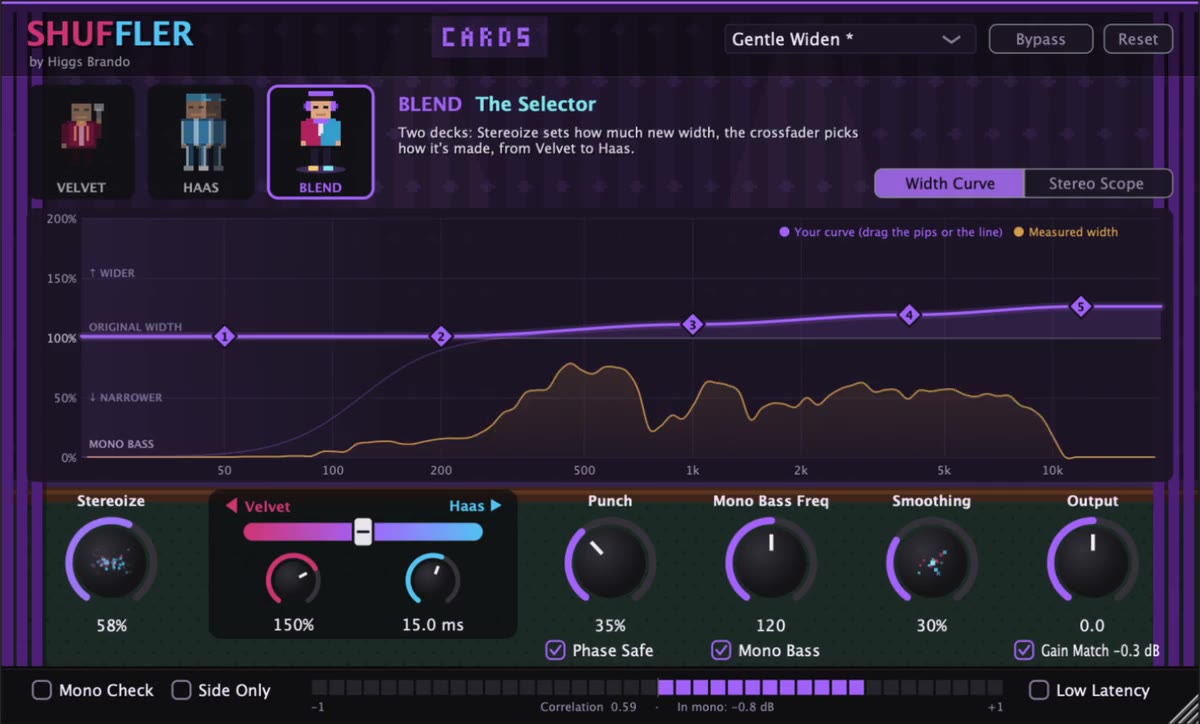
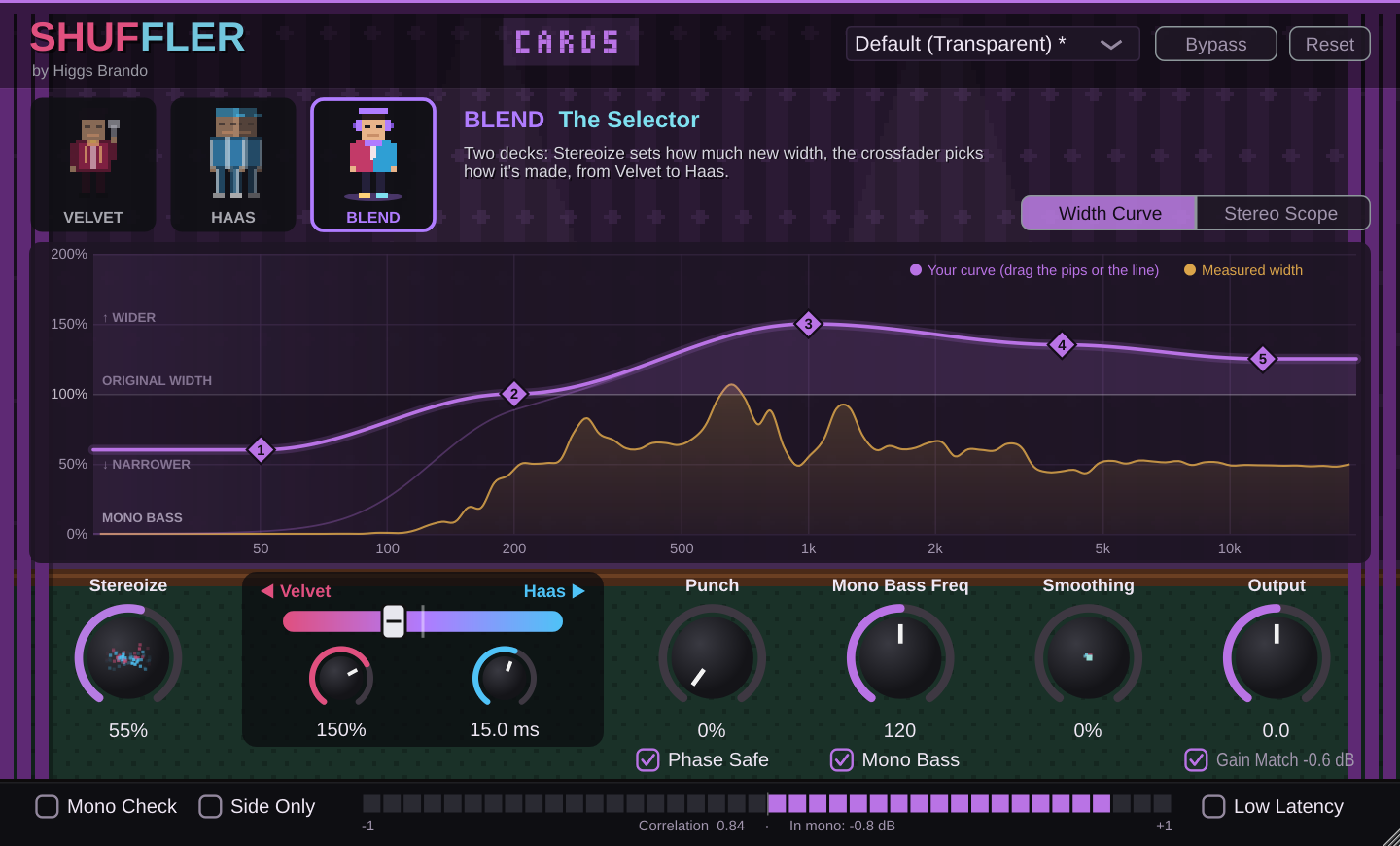
The Shuffler plugin window in Blend: three character cards, a drawn width curve, the Stereoize dial and the Velvet-to-Haas crossfader
BLEND · THE SELECTOR

Two kinds of width.

CHAPTER 01
A

The curve

Scales the width that's already there, one part of the spectrum at a time. Narrow the lows, open up the mids, leave the top alone. 100% leaves it as it was; 0% is mono.

B

Stereoize

Creates brand-new width from the middle of your sound, so it works on mono tracks too. Then the curve shapes all of it, old and new.

The middle is never touched. Left plus right always adds back up to the original, so nothing Shuffler adds can cancel when the mix is folded to one speaker.

Shuffler running on a mono piano recording in Logic
HEAR IT

Flip Bypass.

A real session in Logic: a mono piano recording with Shuffler on it. Play it, flip Bypass and hear the width open up, then fold it to mono and hear it hold together.

Listen now

Choose your character.

CHAPTER 02
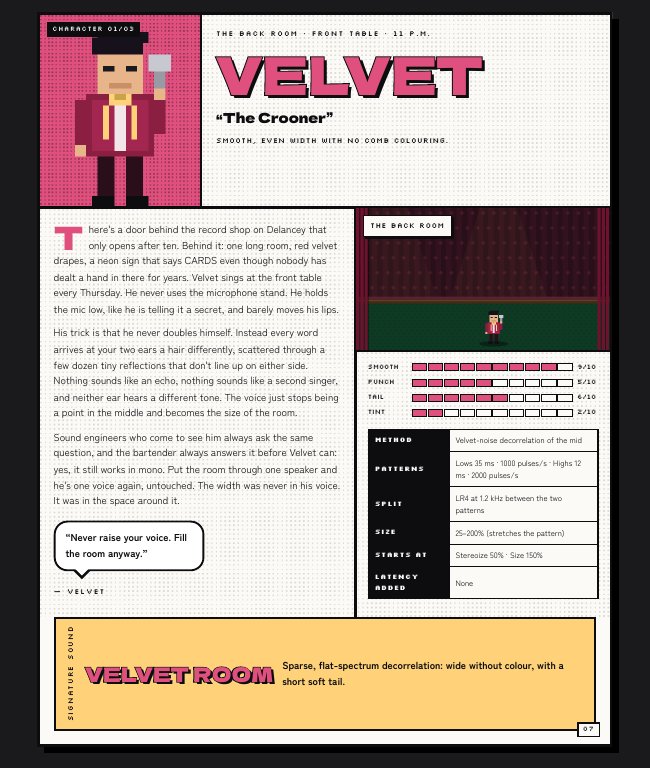
VELVET
The Crooner

Three regulars at the back-room card club, each with their own way of making a room feel bigger. The whole plugin changes colour with whoever is playing; in Blend it follows the crossfader, from velvet red through violet to ice blue.

Draw your width.

CHAPTER 03

Drag the pips

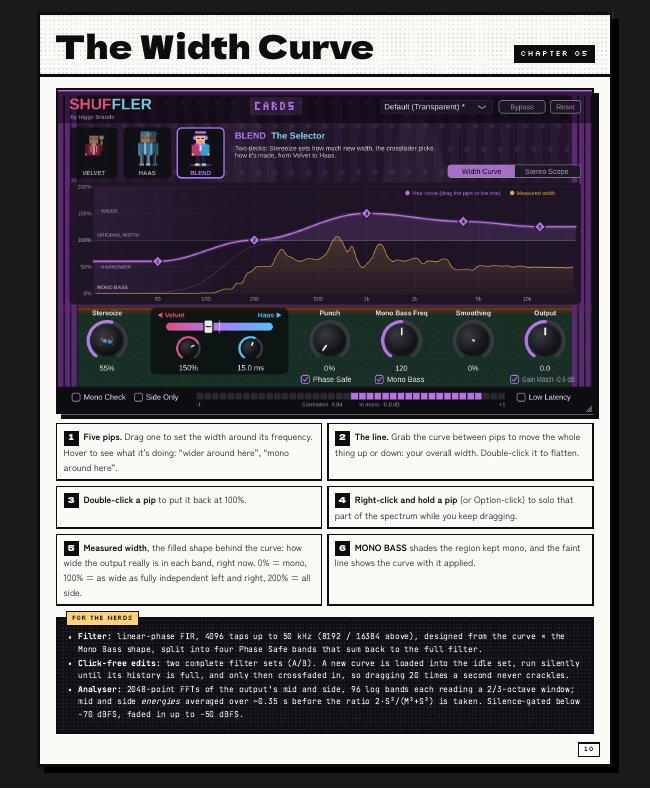
Five points across the spectrum. Pull one up for wider, down for narrower. Hover to see what it's doing around there.

Grab the line

Move the whole curve up or down for overall width. Double-click to flatten it.

Hold to solo

Right-click and hold a pip to hear just that part of the spectrum while you keep dragging.

Everything on one screen.

CHAPTER 04

Measured width

See how wide the output really is in every band, live, behind your curve.

Phase Safe

Keeps any band from being pushed past the point where the speakers fight.

Mono Bass

Everything under the frequency you pick stays mono.

Punch

New width steps back on drum hits so they stay centred.

Smoothing

A small, smooth room for sources too dry to widen nicely.

Stereo scope

Polar sample, polar level and Lissajous views, input and output.

Gain Match

Wider never just means louder. Learns, then holds.

Mono Check

Hear the mono fold-down, or just the side, in one click.

INCLUDED

A collector's manual.

A 15-page comic-book manual with every copy: the three characters' stories, the two kinds of width, the curve, the scope, lab results and the research behind it. Every pixel drawn in code.

Get it.

CHAPTER 05
One-time purchase
Launch price · after launch
  • Shuffler AU + VST3 for macOS
  • Velvet, Haas and Blend
  • The collector's manual
Try before you buy
-day trial
  • Everything works, nothing held back
  • Unlock with your license key at any time
  • Your settings carry over when you buy

Specs.

FormatsAudio Unit (Logic Pro, GarageBand) and VST3
SystemmacOS 11 or later · Apple Silicon and Intel (universal)
ChannelsStereo in, or mono in → stereo out
LatencyAbout 49 ms at 44.1 kHz (0 ms in Low Latency), compensated by the host
MonoMono-safe by design: the middle is never changed
WindowsNot yet

FAQ.

Will it widen a mono track?

Yes, with Stereoize. The curve on its own only scales width that's already there; Stereoize creates new width from the middle, and then the curve shapes it.

What's the difference between the characters?

Velvet makes width from tiny scattered reflections: smooth, no colour. Haas uses one delayed copy: punchier, with a little tint in each speaker. Blend runs both, and a crossfader picks the mix while keeping the total width the same.

Does it hold up in mono?

Yes. The middle of your sound is never changed, so everything Shuffler adds cancels cleanly when summed to mono. Mono Check lets you hear it.

Is it AI?

No machine-learning models and no cloud. Hand-written signal processing that runs in real time on your computer.

What happens when the trial ends?

The plugin asks for a license key. Buy, paste the key in, and you're back exactly where you left off.